
Introduction: Navigating Hotel Bookings Without a Credit Card
Planning a trip often involves securing accommodation, and for many, Booking.com is a go-to platform. It offers an extensive selection of hotels, apartments, resorts, and more, making it a popular choice for travelers worldwide. However, the common assumption is that a credit card is essential for booking. We’re here to tell you that’s not always the case. For various reasons, you might prefer or need to book a hotel without using a credit card. Perhaps you don’t have one, you’re trying to avoid debt, or you simply prefer to pay with cash or a debit card. Whatever your circumstances, understanding how to book a hotel on Booking.com without a credit card can open up a world of travel possibilities.
This guide will walk you through Booking.com’s payment system, explore alternative payment methods, and provide strategies for securing your stay without plastic. We’ll cover important considerations, offer a step-by-step booking process, and address common questions, ensuring you’re well-equipped for a seamless travel experience.
Understanding Booking.com’s Dynamic Payment System
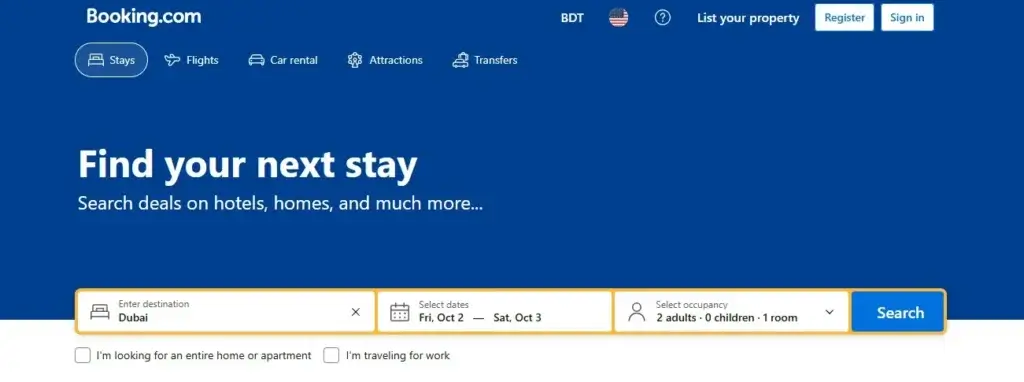
Image Credit: Booking.com
Booking.com’s payment system is designed to be flexible, but its options can vary significantly. It’s not a one-size-fits-all approach, and what’s available to you depends on several factors, including the specific property, your destination, and even your country of origin. This dynamic nature means that while some properties might require immediate payment via credit card, others offer much more leeway.
The platform clearly outlines payment terms for each listing. You’ll often see phrases like “No prepayment needed,” “Pay at the property,” or “Pay now”. This is crucial information for anyone looking to avoid using a credit card. The price displayed for a room usually covers one night for two adults, but it’s vital to check for additional taxes and service charges that might be listed in smaller text below the room price. These can increase the final amount you pay, so always review the total price, including all fees, before confirming your reservation.
Booking.com offers a variety of payment methods, but their availability is not universal. While credit and debit cards (Visa, Mastercard, American Express, Diners Club International, AirPlus) are widely accepted, some hotels might charge your card immediately, while others only use it to guarantee the reservation, with payment collected later.
Alternative Payment Methods for Booking Hotels
The good news is that Booking.com, and many of its listed properties, do offer alternatives to traditional credit card payments. Understanding these options is key to successfully booking without one.
1. Pay at the Property
This is arguably the most straightforward alternative. Many hotels allow you to pay when you arrive at the property. This option is ideal if you prefer not to pay in advance and want to use cash, a debit card, or another payment method directly with the hotel. Even with this option, some hotels might still require a valid credit card to guarantee your reservation, so it’s essential to read the specific property’s payment policy carefully.
2. Debit Cards
While not a credit card, a debit card can often be used in the same way as a credit card for online bookings. Many properties accept major debit cards such as Visa and Mastercard. However, the key distinction is whether the hotel charges your card immediately or simply uses it to hold the reservation. If immediate payment is required, a debit card will work if it has sufficient funds. If it’s only for guarantee, then a debit card can often fulfill that requirement too.
3. Online Payment Options (PayPal, Apple Pay, Google Pay)
Depending on the property and your location, Booking.com may offer online payment options like PayPal, Apple Pay, or Google Pay. These provide a quick and secure way to complete your booking. If available, these can be excellent alternatives to a credit card, allowing you to pay directly from a linked bank account or debit card. Always use secure payment options to avoid fraud.
4. Bank Transfer
Less common, but some properties might accept payment by bank transfer. If this option is available, the hotel will provide specific payment instructions after you make the reservation. This method typically requires more lead time for the payment to clear, so it might not be suitable for last-minute bookings.
5. Properties Not Requiring a Credit Card at Booking
Booking.com explicitly states that many properties offer options that do not require a credit card at the time of booking. These are often tied to the “Pay at the property” option or “No prepayment needed.” This is a key feature to look for when searching for accommodation.
Booking Strategies for Credit Card-Free Stays
To successfully book a hotel on Booking.com without a credit card, a strategic approach is essential. It’s about knowing what to look for and how to use the platform’s features to your advantage.
1. Utilize Filters Effectively
Booking.com offers a wide range of filters to help you narrow down your search.When you’re trying to avoid using a credit card, these filters become your best friends.
- “No prepayment needed”: This is a crucial filter. Selecting this will show you properties that don’t require you to pay anything upfront.
- “Free cancellation”: While not directly related to payment, combining this with “No prepayment needed” gives you maximum flexibility. If your plans change, you won’t be out any money.
- “Pay at the property”: Look for this option specifically within the property details or room type descriptions.
2. Prioritize “Pay at the Property” Options
When reviewing search results, actively seek out listings that clearly state “Pay at the property” as their payment policy. This means you can secure your reservation without entering any card details online, and settle your bill upon arrival using your preferred method (cash, debit card, etc.).
3. Read Payment Policies Carefully
Before clicking “Reserve,” always, always, always read the payment policy for the specific room type you’re interested in. It will explicitly state whether payment is required now or at the property, what accepted payment methods are, and if any prepayment or security deposit is needed. This is where you’ll find out if a debit card can be used as a guarantee even if you pay later.
4. Compare Booking Options
Don’t just jump on the first suitable option. Compare at least 3-5 hotels based on their payment policies, cancellation terms, and included benefits. Some rooms might offer “Reserve Now, Pay Later” or “Book Without a Credit Card” on selected properties.
5. Contact the Property Directly (If Necessary)
If you find a property you love but are unsure about their non-credit card payment options, consider contacting them directly. You can often find their contact information on their Booking.com page or their official website. A quick call or email can clarify if they accept alternative payment methods upon arrival or for guaranteeing the booking.
Important Considerations When Booking Without a Credit Card
While booking without a credit card is entirely possible, there are several key points to keep in mind to ensure a smooth experience.
1. Guaranteeing Your Reservation
Even if you choose to “Pay at the property,” many hotels still require a guarantee for your reservation. This is often done with a credit card, even if it’s not charged until check-out. If you don’t have a credit card, some properties may accept a debit card for this purpose, or they might require a deposit paid via another method. Always confirm the specific guarantee requirements.
2. Security Deposits
Some properties, especially apartments or vacation rentals, may require a security deposit upon arrival. This deposit is usually refunded after check-out, assuming no damages. How this deposit is paid (cash, debit card hold) and refunded can vary, so check the house rules carefully.
3. Prepayment Requirements
Be vigilant about prepayment requirements. While you’re looking for options that allow you to pay later, some bookings, particularly those with discounted rates, might be non-refundable and require immediate payment. If you select such a booking, you’ll need a valid payment method to process the charge right away.
4. Cancellation Policies
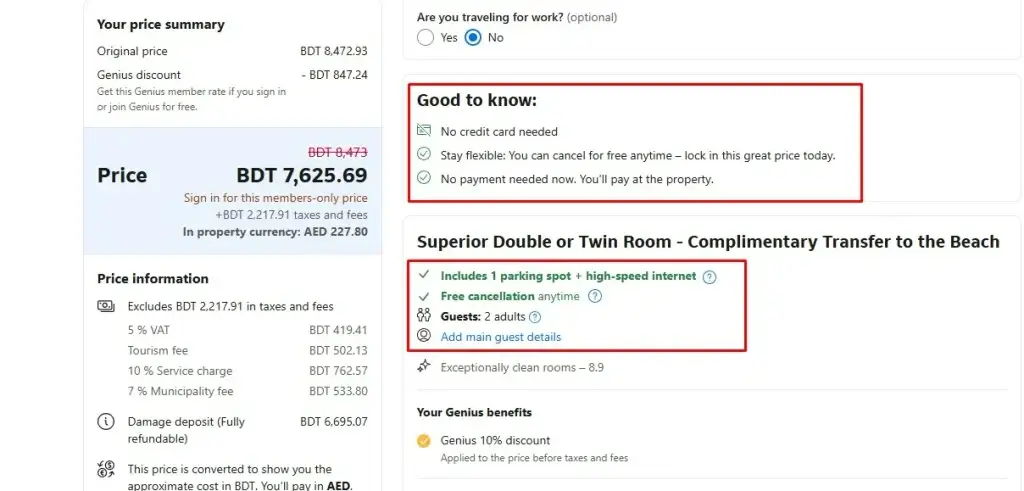
Image Credit: AI Generated
Always review the cancellation policy carefully. If your plans are flexible, choosing a room with “Free cancellation” is the safer option. Even if you haven’t used a credit card to book, understanding the cancellation terms prevents unexpected charges or issues if you need to change your reservation. Some rooms are non-refundable, meaning you’ll lose any payment made if you cancel.
5. House Rules and Additional Charges
Beyond payment, familiarize yourself with the property’s house rules. These can include:
- Check-in and check-out timings
- Child and extra bed policy
- Pet policy
- Smoking policy
- Resort fees (where applicable)
- Additional taxes or service charges not included in the initial price.
Knowing these details upfront can prevent surprises and additional costs during your stay.
Step-by-Step Guide: Booking on Booking.com Without a Credit Card
Image Credit: AI Generated
Here’s a practical guide to help you navigate Booking.com and secure your hotel reservation without a credit card.
Step 1: Access Booking.com
Open the Booking.com website or mobile app.
Step 2: Enter Your Search Criteria
On the homepage, you’ll find the hotel search box. Enter the following details:
- Destination: City, hotel, or landmark
- Check-in date
- Check-out date
- Number of adults
- Number of children (if applicable)
- Number of rooms
Click “Search.”

Step 3: Filter Your Results
Once you have your search results, it’s time to apply filters to find properties that accommodate your preference for not using a credit card.
- Look for the “Filter” or “Sort by” options, usually located at the top or side of the results page.
- Under “Reservation Policy” or similar categories, select options like “No prepayment needed” and “Free cancellation”.
- Also, look for payment-specific filters that might indicate “Pay at property” or “Book without a credit card.”
Step 4: Review Property and Room Details
Booking.com will display a list of available hotels with important information like prices, location, guest ratings, and booking policies.
- Click on individual properties that interest you.
- On the property page, scroll down to the “Availability” or “Rooms” section.
- Carefully read the details for each room type. Pay close attention to the “Payment Policy” and “Cancellation Policy”.
- Look for terms like “Pay at the property,” “No prepayment needed,” or “Book without a credit card”.
- Also, check the “House rules” for any mention of security deposits or accepted payment methods upon arrival.
Step 5: Select Your Room and Proceed to Booking
Once you’ve found a room with a suitable payment policy:
- Click on “Reserve” or “I’ll Reserve” to begin the booking process.
- You’ll be directed to a page to confirm your details and provide guest information.
- On the final booking page, carefully review the total price (including taxes and fees), the cancellation policy, and the payment method.
- If the option “Pay at the property” or similar is selected, you might see fields for credit card details that are labeled as “optional” or “for guarantee only.” In some cases, you might be able to proceed without entering any card information at all, especially if the property explicitly offers “Book without a credit card”.
- If the system still requires a card for guarantee, and you only have a debit card, try entering its details. Many systems will accept a debit card for this purpose. If not, you may need to reconsider the property or contact them directly.
Step 6: Confirm Your Reservation
After reviewing all details and ensuring the payment terms align with your needs, click “Book Now” or “Confirm Reservation.” You should receive a confirmation email with all your booking details.
Conclusion: Seamless Travel with Preparation
Booking a hotel on Booking.com without a credit card is not only possible but can be a straightforward process with the right approach. By understanding Booking.com’s flexible payment options, utilizing search filters effectively, and meticulously reviewing property policies, you can secure your desired accommodation with confidence. Remember to prioritize “Pay at the property” and “No prepayment needed” options, and always double-check the total cost, including all taxes and fees. With careful planning and attention to detail, you can enjoy seamless travel experiences, even without the plastic.
FAQ: Booking Hotels Without a Credit Card
1. Is it always possible to book a hotel on Booking.com without a credit card?
No, it’s not always possible. The availability of credit card-free booking options depends on the specific hotel, its policies, and sometimes your location. However, many properties do offer options like “Pay at the property” or “No prepayment needed”.
2. Can I use a debit card instead of a credit card to book a hotel?
Often, yes. Many properties accept major debit cards (Visa, Mastercard) for payment or to guarantee a reservation. However, it’s crucial to check the specific payment policy of the hotel you’re interested in, as some might have stricter requirements.
3. What does “No prepayment needed” mean?
No prepayment needed” means that you won’t be charged anything at the time of booking. You will typically pay for your stay directly at the property, usually upon check-in or check-out.
4. What if a property requires a credit card to guarantee the reservation, but I don’t have one?
In such cases, you can try entering your debit card details, as many systems accept them for guarantees. If that doesn’t work, consider contacting the property directly to inquire about alternative guarantee methods, such as a cash deposit upon arrival.
5. Are there any properties on Booking.com that allow me to book without any card details at all?
Yes, Booking.com does list properties with options that do not require a credit card at the time of booking. These are often linked to the “Pay at the property” option. You’ll need to look for these specific terms in the booking conditions.
How can I find hotels that offer credit card-free booking options on Booking.com?
Use the filters after performing your initial search. Look for filters under “Reservation Policy” or similar categories, and select options like “No prepayment needed” and “Free cancellation.” Then, carefully read the payment policies for each room type.
Is Booking.com safe to use without a credit card?
Yes, Booking.com is a legitimate and secure platform for booking hotels. When booking without a credit card, ensure you understand the payment terms and use secure payment options like PayPal or Apple Pay if available. Always review the final price and conditions before confirming.